A skill is just a folder with a Markdown file in it. Yet it is the easiest way to make an AI agent do things your way, it works across almost every coding agent now, and a beginner can write one in ten minutes. Released by Anthropic in October 2025, skills became an open standard that December. So how do we get started, and what simple benefit can we get out of using skills? Let’s dig in below. This walkthrough uses Claude Code, but the same ideas carry over to other agents.
We are going to start with something simple and easy and build off this in next week’s post. First, you can use some already built ones. Here are some sites that offer a good collection of skills: https://github.com/obra/superpowers, https://github.com/travisvn/awesome-claude-skills and https://skills.sh. At a high level, all you have to do is copy some of the skills listed on those sites into the .claude/skills/ folder in your project (or ~/.claude/skills/ to have them in every project). If there is no skills folder, create one and drop some in. Each skill lives in its own subfolder with a SKILL.md file inside, for example .claude/skills/security-check/SKILL.md.
One word of caution: a skill is a set of instructions, and sometimes scripts, that your agent will follow. Read through any skill you download before you install it.
Here is what a minimal SKILL.md looks like:
---
name: security-check
description: Checks the project code base against common security threats. Use when asked for a security review or audit.
---

Review the code in this project for common security problems such as injection, hard-coded secrets, and missing input validation. List each finding with the file, the line, and a suggested fix.
The description matters: the agent reads it to decide when to load the skill on its own, so you don’t always have to call it by name.
Now what if we want to build our own skill, how do we do that? We are going to go with the simplest route: downloading the skill-creator folder, which can be found here, and putting it in our .claude/skills folder. This skill allows us to build a skill using our prompting without having to get deep into the skill layout. If you want to know everything about agent skills you can review it here.
Now for some coding/prompting action.
Enter the following in your chat.
I want to build a skill where I can check the project code base against top known security threatsIt should reply with something like the following.
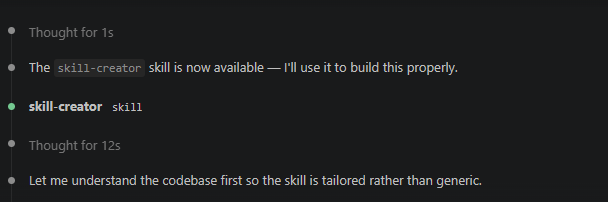
Then you will get some questions about what kind of skill you want to build. Here are some example questions:
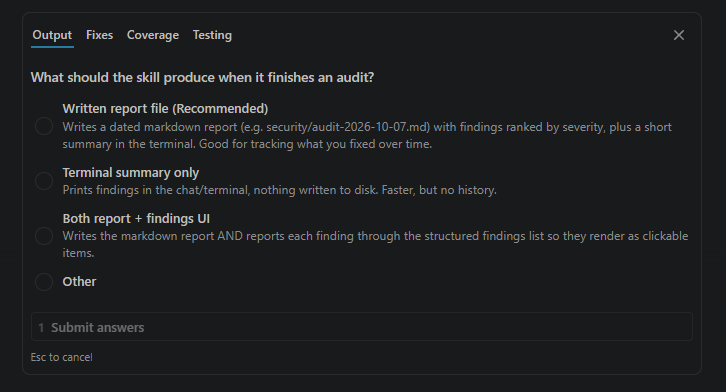
Go through the walkthrough and it will build your skill for you. Once it’s done, it will give you your finished skill, which you can run using /{skill name it gave}. Claude will also use it on its own when a task matches the skill’s description.
One of the most powerful things about skills is that you don’t have to do everything yourself. Building skills is easy, but it still takes time and effort, so the sites I mentioned earlier are a good place to find ones that are already built. Next week we will build on the skill we made here.
Skill Articles
- Anthropic engineering blog, “Equipping agents for the real world with Agent Skills” (Oct 16, 2025): https://www.anthropic.com/engineering/equipping-agents-for-the-real-world-with-agent-skills
- Agent Skills open standard, overview + spec + quickstart: https://agentskills.io (spec: https://agentskills.io/specification)
- Claude Code skills docs (locations, frontmatter, tips): https://code.claude.com/docs/en/skills
- Claude platform skills overview: https://platform.claude.com/docs/en/agents-and-tools/agent-skills/overview
- Anthropic’s example skills repo: https://github.com/anthropics/skills
Skill Repos
- obra/superpowers (dev methodology as skills): https://github.com/obra/superpowers
- travisvn/awesome-claude-skills: https://github.com/travisvn/awesome-claude-skills
- skills.sh directory: https://skills.sh