
Written November 4, 2026. Postman says changes are coming, so this may move quickly.
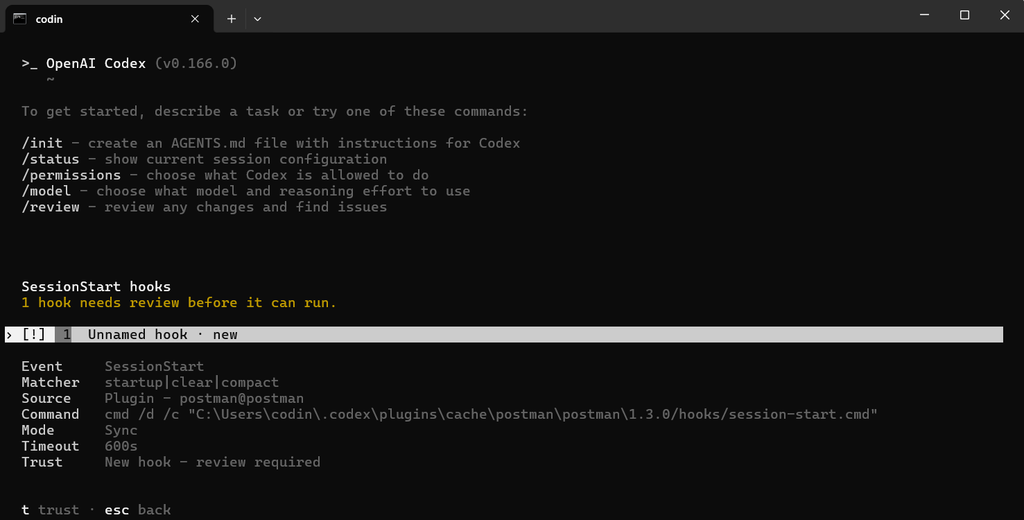
Something I caught on the news the other day which made me do a double take. In late October, a user reported on GitHub that a Postman desktop update had installed Postman plugins into their Claude Code and Codex setups without asking. On Codex, the installer also approved its own startup script, which is the part that made developers angry.
No one has shown your data going anywhere because of this. The reporter says so directly. But if you use an AI agent, it raises a fair question about who else has been giving it instructions, and you can answer that in about two minutes.
What the report says
The report comes from a GitHub user called indicava, who was on a Mac with Postman 12.33.4. Their Postman log shows an install running under the label auto-existing-upgrade, and the result reads claude-code:installed and codex:installed. It changed settings files that belong to those other tools, and it also put a Postman program in ~/.local/bin.
I tested this out today and was shocked that it actually was true. I simply just installed postman and then checked my claude settings and the plugin folder. What is even crazier or lazy, not sure which one, it like when it installs in Claude the folder has all the codex in it. Basically it looks like they use 1 folder for both installs.
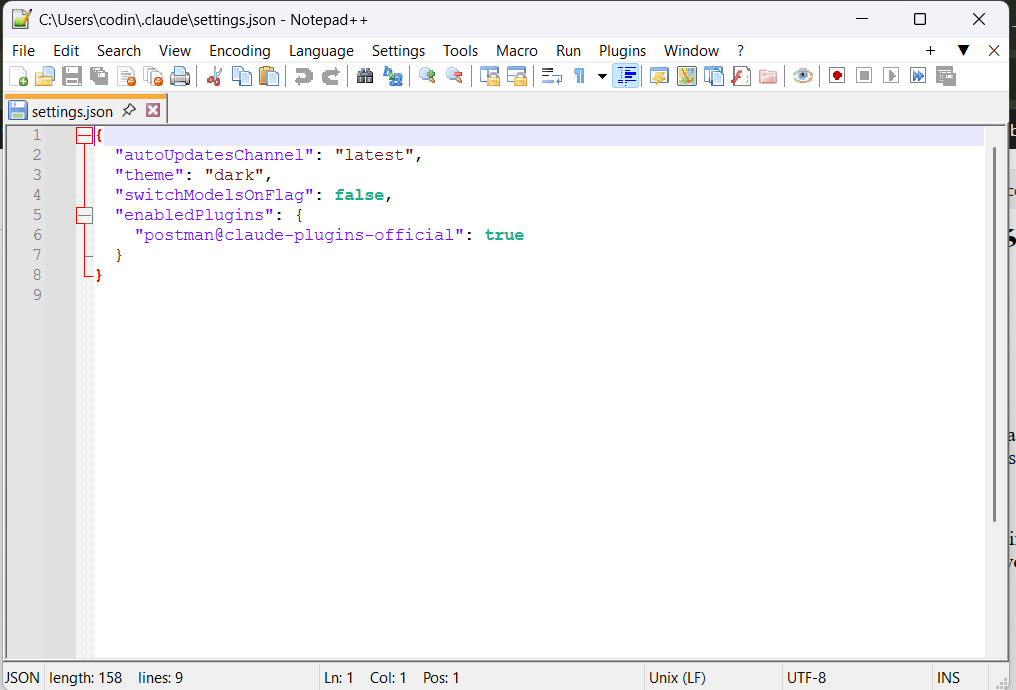
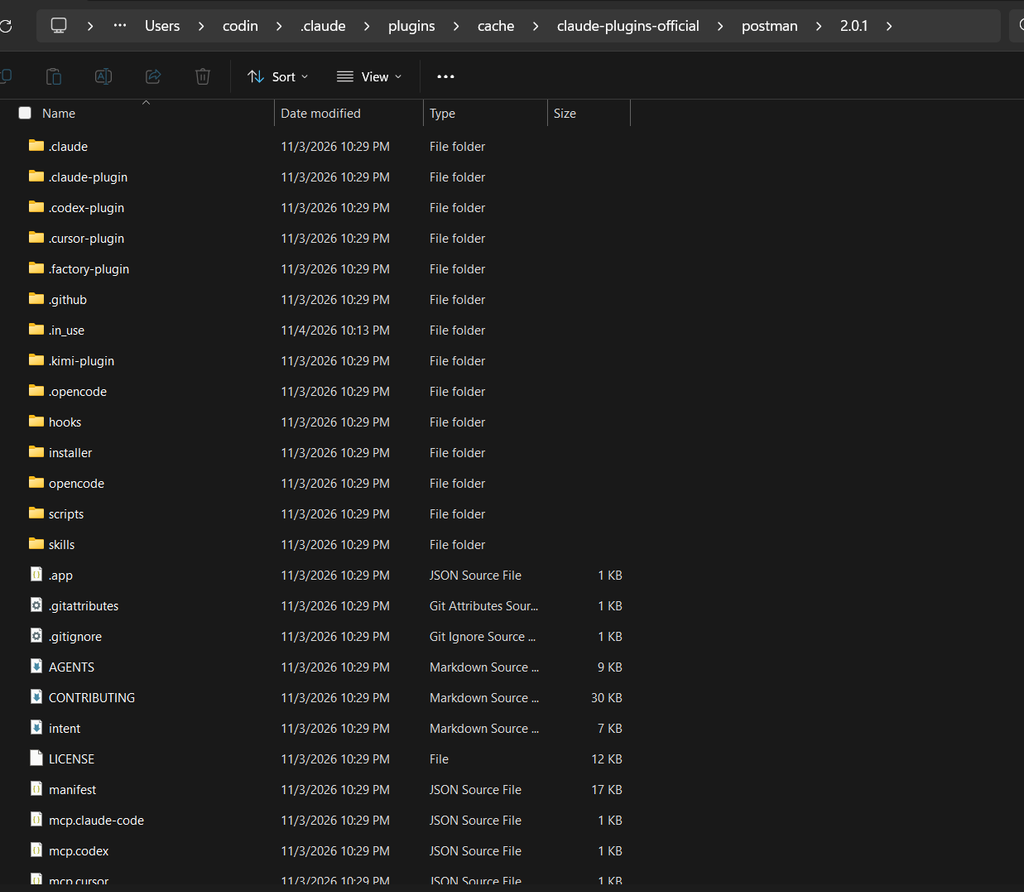
Who approved this?
Codex has a safeguard for exactly this situation. Its docs say “Non-managed hooks must be reviewed and trusted before they run.” A person is supposed to look at the note before it counts.
Postman’s docs describe what its installer does instead: “The installer approves the hook for you.” The repo has a change called “auto-approve Postman’s Codex hook” dated October 21, three days before the reporter’s install. So this looks like a deliberate feature to us, with no sign of a slip. To go back to the desk, the vendor left the note and then ticked the box saying you’d read it.
It doesn’t seem to land every time. ronthedrummer found no approval record in their Codex settings, on an older Codex version, and says they didn’t watch the hook run.
Claude Code works differently. A plugin’s hooks are active once the plugin is enabled, and Postman’s repo currently includes a startup hook in what looks like the Claude Code plugin format.
Was this a big deal?
Hacker News gave it nearly 1,500 points under a title saying Postman “attempts to share all API data”. That goes further than the report, which says it “does not claim to establish data exfiltration”, meaning data being sent out. What it does show is a tool changing other tools’ settings without clear consent. The reporter calls that “a severe consent and trust-boundary problem”, and we agree.
To be fair to Postman, the plugin is a real product with published code. Its downloads page says “The Postman app includes Postman CLI & Postman plugins”. This is where it gets I think really crazy, we have possibly ability for an application to inject itself into an AI coding agent that does things that people are more and more on the side of “auto-approve”,
The two-minute check
Step 1: See what’s installed
For Claude Code, run this in a terminal:
claude plugin listFor Codex, start codex and type /plugins.
Step 2: See what runs by itself
Inside a Claude Code session, or inside Codex, type /hooks. Look for anything you don’t remember adding, and read what it runs.
Step 3: Look for Postman by name
On a Mac or Linux, this searches the files named in the report:
grep -il postman ~/.claude/settings.json ~/.claude/plugins/installed_plugins.json ~/.codex/config.tomlIt prints the name of any file that mentions Postman and nothing otherwise. An error about a missing file only means you don’t have that file. Paths differ on Windows, and we haven’t tested those.
Step 4: Remove it if you don’t want it
If you’d rather not keep it, Claude Code’s documented command would be:
claude plugin uninstall postman@claude-plugins-officialWhat to watch out for
We don’t know how many people got this, or whether it happens on every update. If you use Postman make sure you if you don’t want it pay attention to your plugins and uninstall it.
After After Dark To Try
- Run the check above, even if you’ve never installed Postman. You may find other plugins you’ve forgotten about.
- Pick one hook or plugin, read what it does, and decide whether it stays.
- Save a copy of your settings with
cp ~/.claude/settings.json ~/claude-settings-backup.json. After your next round of app updates, rundiff ~/claude-settings-backup.json ~/.claude/settings.jsonto see whether anything changed.
Sources
Official (primary sources)
- Postman: install into detected agents. “The installer approves the hook for you”, plus the
removecommand. - Postman plugin overview. How the plugin uses the CLI and MCP server.
- postmanlabs/postman-plugin. The hook’s text and files.
- postman-plugin commit history. The October 21 auto-approve change.
- Postman downloads page. What the page says the app includes.
- Codex: hooks. Review and trust rules, and
/hooks. - Codex: plugins. The
/pluginscommand. - Claude Code: hooks. What hooks are, plugin hooks, and
/hooks. - Claude Code: permissions. What runs before you trust a folder.
- Claude Code: install and manage plugins. The list and uninstall commands.
Independent tests
- Postman issue #14370. The original report and logs, the second report, and the reply written as “we”.
- Foma on bokonon.ai. Unconfirmed tests of hook approval, written by an AI agent.
News and explainers
- Hacker News thread. The title, the reaction and the logging claim.
- Postman on HIPAA compliance. Linked by a Hacker News commenter. Not opened.