Written October 21, 2026. Anthropic is redesigning Projects right now, so menus may move. The links at the bottom have the latest.
You open Claude and explain the job: who you are, what you’re working on, how you like answers. You paste in a document or two. The answer is great. Next day you open a new chat, and you explain it all again.
That’s because every new chat starts with a blank mind. Claude only knows what’s in front of it.
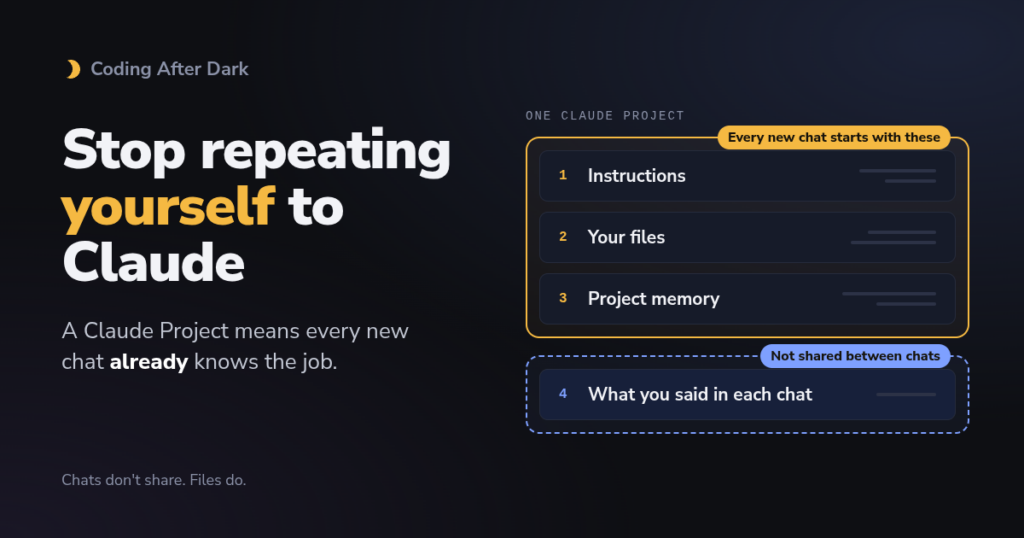
A Claude Project fixes that. It’s a workspace that holds your instructions and files, so every chat you start inside it already knows the background. This post covers what a Project is, what it’s good for, what it costs, how to set one up, and one worked example (a trip planner) to show it in action.
What is a Claude Project?
Picture starting a new assistant on their first day. You don’t explain everything out loud every morning. You hand them a binder: a page on the front that says how you like things done, and the documents they’ll need behind it. Every morning, they open the binder.
Anthropic describes Projects as “self-contained workspaces with their own chat histories and knowledge bases” (Anthropic’s help article). A Project has four parts:
| Part | What it does | In the binder |
|---|---|---|
| Instructions | Text Claude follows in every chat in the Project | The page on the front: “here’s how I like things done” |
| Knowledge | Files you upload; Claude uses them in every chat | The documents behind it |
| Chats | Ordinary conversations, grouped together | Each day’s conversation with your assistant |
| Memory | Things Claude picks up and remembers inside this Project | What your assistant remembers on their own |
One detail surprises people: the Project’s name and description are for you only. Anthropic’s setup guide says “Claude won’t see these details.” Anything Claude should know goes in the instructions or the files.
What are Projects good for?
A simple test: if you’ve pasted the same background into Claude more than twice, it wants to be a Project. Some everyday examples:
- A trip: dates, bookings and budget, for itineraries, packing lists and “what time is check-in?”
- A job hunt: your CV and the job ads, for cover letters, interview practice and follow-up emails.
- A class or a new skill: the syllabus and your notes, for quizzes and explanations at your level.
- Meal planning: your family’s likes, allergies and budget, for weekly menus and shopping lists.
- A small business or side gig: your prices, policies and tone, for replies to customers.
- A hobby project: a garden plan, a car restoration, a home renovation, with the details that never change.
Projects are less useful for one-off questions. If you’ll only ask once, a normal chat is fine.
Who can use it, and what does it cost?
Projects work on every plan, including free. The difference is how many you get and a few extras.
| Plan | Price | Projects | Extras |
|---|---|---|---|
| Free | $0 | Up to 5 | Instructions, files, memory |
| Pro | $20/month ($17/month billed yearly) | No stated limit | Searches big Projects, searches past chats |
| Max | From $100/month | No stated limit | Same as Pro, with more usage |
| Team / Enterprise | Per seat | No stated limit | Plus sharing a Project with colleagues |
Prices are from Claude’s pricing page. Some older guides say Projects are paid-only. That’s out of date: the current help center says free accounts get five (tl;dv tested this on a free account).
What this means for you: five free Projects is enough to try this properly. You’d only pay if you want lots of Projects, very large file collections, or to share one with other people.
How much can you put in it?
- Files up to 30 MB each. PDFs, Word documents, spreadsheets (CSV, and XLSX if code execution is on), plain text and images all work (Anthropic’s upload limits).
- PDFs up to 100 pages are read with their pictures and layout. Longer ones (up to 1,000 pages) are read as text only.
- No fixed number of files, but everything has to fit in what Claude can read at once.
On paid plans, a Project that gets too big switches on a search mode automatically. Instead of reading every file every time, Claude looks up the parts it needs, like using a book’s index instead of rereading the whole book. Anthropic says this stretches a Project’s capacity “by up to 10x while maintaining quality responses” (Anthropic’s RAG article). One independent test filled a Project with about 845,000 words and Claude still found a planted test phrase at every fill level (tl;dv). That was one person on one day, so treat it as encouraging, not proof.
Most everyday Projects are a handful of small files and never get close.
How to set one up
Step 1: Create the Project
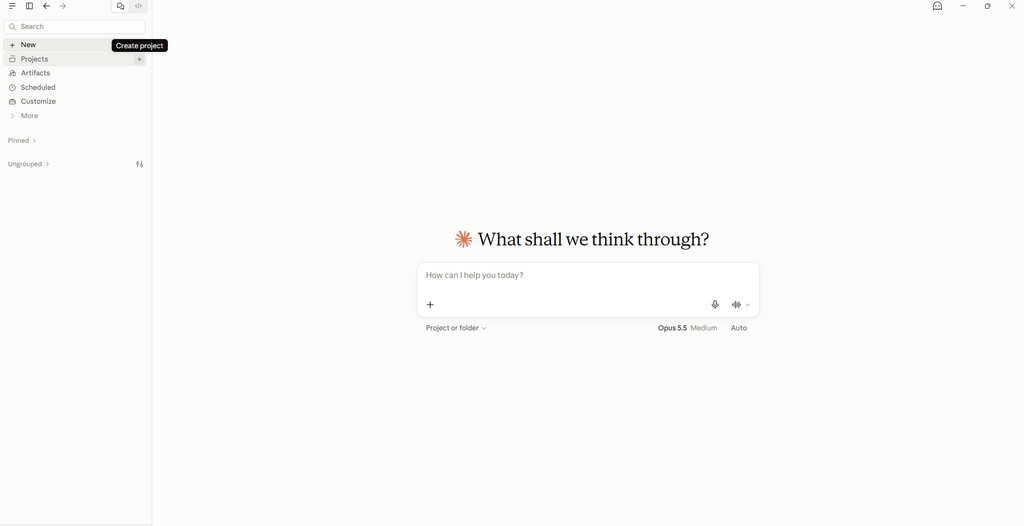
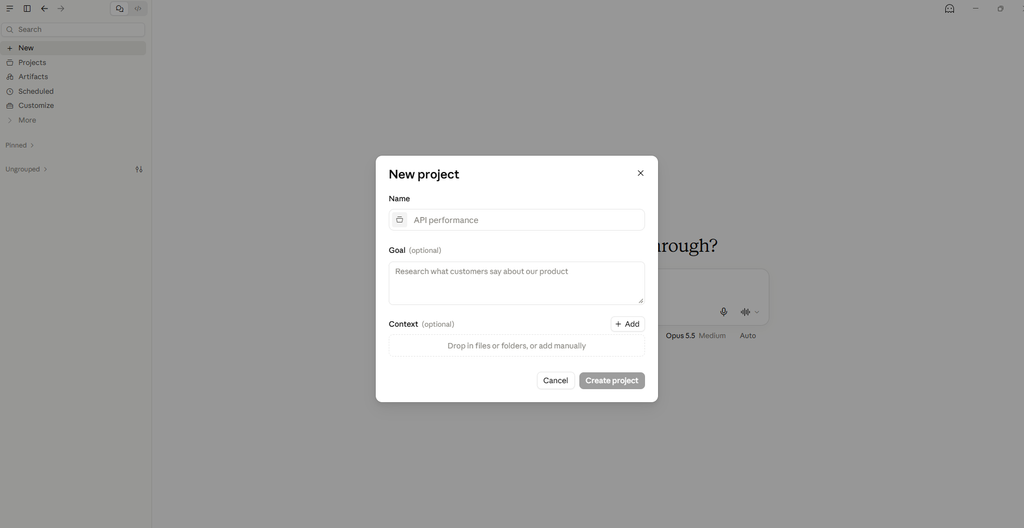
In the Claude app, open Projects in the left sidebar and click + New Project. Give it a name you’ll recognize. The description is optional and only for you.
Step 2: Write the instructions
Click Set project instructions. Good instructions are short and cover four things:
- Who it’s for and what the job is. “You’re helping me plan meals for a family of four.”
- What matters to you. Budget, likes and dislikes, tone.
- What to trust. “Use the files in this project as the source of truth. If something isn’t in the files, say so instead of guessing.”
- What answers should look like. “Short lists and tables, not essays.”
Step 3: Add your files
Add the documents you keep pasting. Fewer, clearer files work better than a big pile: one up-to-date summary beats five old versions.
Step 4: Start a new chat for each job
Each new chat in the Project starts with the instructions and files already loaded. You can also move an existing chat into a Project from the menu next to its name (Add to project).
Example: a trip planner, start to finish
To see it working, here’s a made-up trip: 4 days in the Appalachian Mountains, two adults, $1,800 to spend on food, activities and gas (flights, rental car and a cabin near Asheville, North Carolina already paid). Name the Project “Appalachians, May” and paste these instructions:
You're helping two adults plan a 4-day trip to the Appalachian Mountains (Great Smoky Mountains and the Blue Ridge Parkway), staying in a cabin near Asheville, North Carolina.
- Budget is $1,800 total for food, activities and gas (flights, rental car and cabin are already paid).
- We like easy to moderate hikes, waterfalls, scenic drives and local food. We don't like early mornings or crowded trailheads.
- Use the files in this project as the source of truth for dates, times and bookings. If something isn't in the files, say so instead of guessing.
- When you mention an opening time, price, trail or road condition, say it may have changed and suggest checking the official site (for example the National Park Service).
- Keep answers short: lists and tables, not essays.
Then add three small files:
trip-brief.txt: dates, flight times, the cabin’s address and check-in time, rental car pickup, must-see hikes and drives, anything you can’t eat.- Booking confirmations as PDFs, with booking references, passport numbers and payment details blacked out. Or skip the PDFs and type the key facts into the trip brief.
budget.csv: a tiny spreadsheet with two columns, what you spent and how much.
Now open a new chat for each of these, and notice you never explain the trip again:
Make me a day-by-day plan. Keep day 1 light, we land in Asheville at 3pm.Packing list for this trip.We spent $140 on day 1: dinner $62, gas $38, picnic groceries $40. How are we doing on budget?What time is cabin check-in, and what's the address?The last one is a quick honesty check: the answer should match your PDF exactly. For the packing list, turn on web search if you want a real forecast. Otherwise Claude goes on typical weather for that month.
The same pattern works for any of the examples above. Swap the trip brief for your CV, your syllabus or your price list.
Why doesn’t a new chat know what I decided?
This is the one thing to understand about Projects. Chats inside a Project don’t see each other. Only the files and instructions are shared (Anthropic’s setup guide).
Try it with the trip: in one chat, decide to skip the Cades Cove loop drive and book a whitewater rafting trip instead. Open a new chat and ask about day 3. It won’t know. Your assistant has the binder, but wasn’t in yesterday’s meeting.
The fix takes a minute: update the file on your computer, delete the old copy from the Project and upload the new one. Replace, don’t add. A file in a Project is a copy, not a link, and if an old and a new version sit side by side, Claude can’t tell which one is current (tl;dv).
What about memory? Each Project has its own memory, which is on by default on Free, Pro and Max. Inside a Project, Claude can also use what it remembers from your ordinary chats, unless you switch off Use account memory on the Project’s page (Anthropic’s memory article). Memory helps, but you don’t control exactly what it keeps. For facts that must be right, the file is the place.
What’s this new Projects beta I keep hearing about?
Anthropic is testing a redesigned Projects, starting in Claude Code (its tool for programmers) for some Pro and Max users. In the new version, “a project is one conversation.” Claude splits the work into side tasks that run at the same time in the cloud and report back (Anthropic’s help article). It’s coming to the regular chat app later.
What this means for you: nothing yet, if you use Claude for everyday things. Everything in this post is the Projects you can use today. Anthropic says existing Projects that get moved to the new version lose nothing.
What to watch out for
- Personal data in your files. CVs, booking emails and receipts can include addresses, ID numbers and card details. Black them out or retype only what’s needed. While you’re at it, look at Claude’s privacy settings to see how your chats may be used.
- Claude can be wrong about the world. It knows what’s in your files and what it learned in training. With web search on it can look things up, but check official sites for anything that matters, like opening hours, prices or road closures.
- Instructions are guidance, not a lock. People on Reddit report Claude sometimes drifting from Project instructions, especially in long chats (r/ClaudeAI megathread). These are user reports, not measured. If answers start drifting, start a fresh chat in the Project.
- No sharing on personal plans. On Free, Pro and Max you can’t share a Project with someone else. Sharing is Team and Enterprise only.
- Stale files. Delete the old version when you upload a new one.
After After Dark To Try
- Find your repeat. Look back at your last ten Claude chats. What background did you paste more than once? Make that your first Project, with three lines of instructions and one file.
- Run the two-chat test. Decide something in one chat, then ask about it in a brand-new chat. Watch it not know. Then fix it by updating the file, and ask again.
- Copy the trip planner. Use the instructions above for your next trip, or one you’ve already taken, and see how far one trip brief gets you.
Sources
Official (primary sources)
- What are projects?: Anthropic’s definition, the free-plan limit, sharing, and the new Projects beta.
- How can I create and manage projects?: setup steps, name and description not seen by Claude, chats not sharing context, moving chats, memory toggle.
- Upload files to Claude: file size, file types and PDF page limits.
- Retrieval augmented generation (RAG) for Projects: the search mode for big Projects and the “up to 10x” claim.
- Use Claude’s chat search and memory: per-Project memory and past-chat search.
- Claude pricing: plan prices and Project limits.
Independent tests
- tl;dv: Claude Projects, setup, limits, and what happens when one fills: the free-plan check, the 845,000-word fill test, and the warning about stale files.
News and explainers
- Wyndo, “How to Use Claude’s New Projects” (AI Maker): a first look at the redesigned Projects beta.
- r/ClaudeAI performance and bugs megathread (not opened; seen in search results): user reports of instructions being ignored.