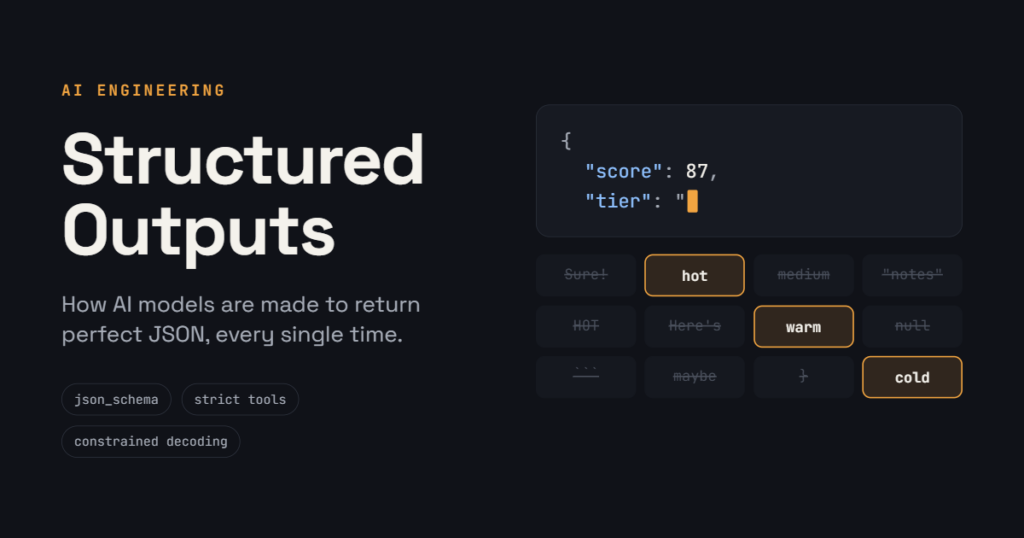
If you’ve ever plugged an AI model into an app, you’ve probably hit this problem. You ask for JSON, and most of the time you get it. Every so often, though, the model adds “Sure! Here’s your data:” in front of it, forgets a field, or renames one. Your code tries to read it and crashes.
Structured outputs fix that. Here’s what they are, how we got by before them, how they actually work, and which option to use when.
What are structured outputs?
You give the model a template (called a JSON Schema) that describes exactly what the answer should look like: which fields it has, what type each one is, and which values are allowed. The model’s answer is then guaranteed to match that template.
That guarantee is the whole point. A well-written prompt gets you the right format most of the time. Structured outputs get it right every time.
They’re useful whenever your code reads the AI’s answer:
- Pulling details out of emails, invoices or documents
- Sorting support tickets into categories
- Scoring sales leads
- Making sure an AI agent sends valid data to the tools it uses
How we did it before
Asking nicely. Early on, we wrote “Reply only in JSON, like this:” in the prompt, then added code to clean up the answer and retry when it went wrong.
JSON mode. Providers then added a setting that guaranteed valid JSON. It would always parse, but fields could still be wrong or missing.
The tool trick. The smartest workaround used tools (also called function calling). Models are trained to fill in a tool’s inputs carefully, because tool calls get run by code. So we created a fake tool whose inputs were exactly the data we wanted:
{
  "name": "save_lead_score",
  "description": "Save the score for this lead.",
  "input_schema": {
    "type": "object",
    "properties": {
      "score": { "type": "integer" },
      "tier": { "type": "string", "enum": ["hot", "warm", "cold"] }
    },
    "required": ["score", "tier"]
  }
}
We forced the model to call this tool, took the inputs it generated as our JSON, and used them in our own logic. If the conversation had to continue, we replied to the model with a simple {"success": true}. The tool never did anything. It was simply a container for the data.
This worked well, but the template was still only a strong hint. Once in a while a field went missing, so we still had to check everything. OpenAI added real structured outputs in August 2024, and Anthropic followed for Claude in November 2025.
The right way today: use the built-in setting
Both OpenAI and Anthropic now have a setting for this in their APIs and SDKs. You pass your template as the response format, and the answer is guaranteed to match it every time. No fake tool, no cleanup code, and no retries for missing fields.
On Claude, the raw API request looks like this:
{
  "model": "claude-opus-5-5",
  "max_tokens": 1024,
  "messages": [{ "role": "user", "content": "Score this lead: ..." }],
  "output_config": {
    "format": {
      "type": "json_schema",
      "schema": {
        "type": "object",
        "properties": {
          "score": { "type": "integer" },
          "tier": { "type": "string", "enum": ["hot", "warm", "cold"] }
        },
        "required": ["score", "tier"],
        "additionalProperties": false
      }
    }
  }
}
On OpenAI, the same template goes in the response format with "type": "json_schema" and "strict": true. The SDKs make it even easier: you describe the template once with Zod (TypeScript) or Pydantic (Python), and the SDK sends it for you and hands back a typed object. You’ll see both providers in the example further down.
How it works (the simple version)
An AI model writes its answer one small piece at a time. These pieces are called tokens. A token can be a word, part of a word, or a symbol like {.
Picture the model with a giant bag of word tiles. At each step it looks at all the tiles and picks the one it thinks fits best. Normally it can pick any tile it wants, which is how “Sure! Here’s your data:” sneaks in.
With structured outputs, a helper stands next to the model holding your template. Before every pick, the helper hides all the tiles that wouldn’t fit the template at that spot. The model can only choose from the tiles that are left.
Here’s what that looks like with the lead score template above:
- At the very start, the only tile left is
{. “Sure!” is hidden. - After
"score":, only number tiles are left. - After
"tier": ", onlyhot,warmandcoldare left. - Once every required field is filled in, the only tile left is the closing
}.
The model never breaks the template, because breaking it is never one of its options. That’s the guarantee.
Two small details make this practical. First, the provider turns your template into the helper’s rulebook once and saves it, so the first request with a new template is a little slower and the ones after it are fast. Second, the model is also told about the template in its instructions, so the model and the helper are working toward the same answer.
For the curious: the technical name is constrained decoding. The “rulebook” is a grammar built from your JSON Schema, and “hiding tiles” means setting the probability of every invalid token to zero.
Forcing a tool call vs. a JSON response format
Today there are two proper options. Both use the same helper, so both are guaranteed.
Strict tool (strict: true) | JSON response format (json_schema) | |
|---|---|---|
| Where the JSON shows up | In the tool call’s inputs | As the model’s final answer |
| Best for | The AI doing something: creating a ticket, booking, updating a record | The AI answering with data: extracting, classifying, scoring |
| Extra work | Send a tool result back if the conversation continues | None |
A simple rule: if the model is taking an action, use a strict tool. If the model is handing you data, use the JSON response format.
The old forced-tool trick still works. Without strict: true it carries no guarantee, though, and on Claude a forced tool call can’t be combined with extended thinking.
Does it make the answers worse?
For pulling out and sorting data, generally no. For tasks that need real thinking, it can, if the template makes the model answer before it has thought things through. A 2024 study, Let Me Speak Freely?, found reasoning scores dropped under strict formats. Others argued the drop came mostly from how the prompts were written.
Three habits keep quality high:
- Let it think first. Turn on extended thinking (on Claude, the template only applies to the final answer), or put a short
reasonfield before theanswerfield. - Give it an honest way out. If a field is required, the model has to write something, even when the information isn’t there, so it will make something up. Allow
nullfor optional data, and add"unknown"to lists of choices. - Name fields clearly. The model reads your field names and descriptions, so treat them as part of the prompt.
One more thing to remember: the template guarantees the shape of the answer, and the values inside can still be wrong. Keep checking the things that matter.
Example: Claude and OpenAI
Here’s the same task with both providers in TypeScript: pulling shipment details out of an email.
import { z } from "zod";
import Anthropic from "@anthropic-ai/sdk";
import { zodOutputFormat } from "@anthropic-ai/sdk/helpers/zod";

const Shipment = z.object({
  pickup_city: z.string(),
  delivery_city: z.string(),
  weight_lbs: z.number().nullable(),
  equipment: z.enum(["dry_van", "reefer", "flatbed", "unknown"]),
});

const email = "Need a reefer from Pittsburgh to Columbus next Tuesday, about 38,000 lbs.";

const anthropic = new Anthropic();
const res = await anthropic.messages.parse({
  model: "claude-opus-5-5",
  max_tokens: 1024,
  messages: [{ role: "user", content: `Extract the shipment details:\n\n${email}` }],
  output_config: { format: zodOutputFormat(Shipment) },
});

console.log(res.parsed_output);
// { pickup_city: "Pittsburgh", delivery_city: "Columbus", weight_lbs: 38000, equipment: "reefer" }
The OpenAI version is nearly identical:
import OpenAI from "openai";
import { zodTextFormat } from "openai/helpers/zod";

const openai = new OpenAI();
const res = await openai.responses.parse({
  model: "gpt-5",
  input: `Extract the shipment details:\n\n${email}`,
  text: { format: zodTextFormat(Shipment, "shipment") },
});

console.log(res.output_parsed);
Limitations to know about
- Only part of JSON Schema is supported. Both providers need
additionalProperties: falseon every object. On Claude, rules likeminimum,maximum,minLengthandmaxLengtharen’t enforced by the model (the SDKs check them in your code instead). OpenAI requires every field to be listed as required, so optional data is written as nullable. See Claude’s list and OpenAI’s list. - The first request is slower. Your template is turned into a rulebook the first time you use it. Claude keeps it cached for 24 hours after its last use.
- Very large templates can be rejected. Claude allows up to 20 strict tools, 24 optional fields and 16 fields with more than one type per request. Details are in Claude’s complexity limits.
- Refusals and cut-off answers. If the model declines a request for safety reasons, or runs out of
max_tokens, the answer may not match the template. Check the stop reason before reading the JSON. - Some features don’t mix. On Claude, JSON output can’t be combined with citations or with prefilling the model’s answer.
Wrapping up
Structured outputs turned “the AI usually gets the format right” into “the AI can’t get the format wrong.” Behind the scenes the idea is simple: a helper hides every option that doesn’t fit your template. Use a JSON response format when you want data back, a strict tool when the AI is taking an action, and write your template as carefully as your prompt.