.
During our first weeks and months using Claude code and codex we found that sometimes the same thing we told it in one chat wouldn’t carry over to others. That’s not to say we always want our tools to remember everything session/chat but what if we wanted it to always remember certain things. One thing was a certain we were working on an application that needed to stay Python 2 and it kept wanting to do it Python 3. So we put a memory on the application (project) to only write in Python 2.
Next thing was what could we do at a global level. Most time I use Claude to help figure out how to do things in Claude code, but just because you ask it to do something doesn’t mean you shouldn’t know how it is done. I added a global memory to always to write using a specific coding framework when we are building new applications.
We’ll go through the two kinds of memory, how the four tools most people use handle them (Claude Code, OpenAI’s Codex, Google’s Gemini CLI and GitHub Copilot), what a recent study found about what actually helps, and then a short file you can copy and use tonight.
Two kinds of memory
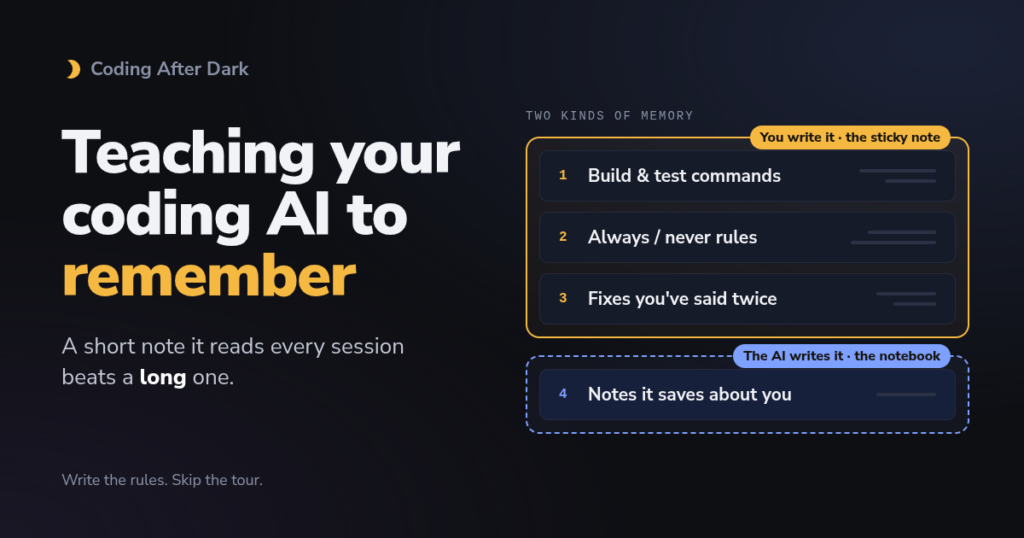
There are two ways you can make a memory, ones is a small note like “sticky note” another one is “notebook”. Instruction files are markdowns stored in project your working on, when others work on project their AI picks up what you left. Notebooks are really memories or instructions tied to your machine no one else sees them.
Here’s a breakdown
| Instruction file (the sticky note) | Auto memory (the notebook) | |
|---|---|---|
| Who writes it | You | The AI |
| Where it lives | Usually a plain text file in your project | A hidden folder on your computer, or on GitHub |
| Shared with your team? | Usually, if you commit it to the project | Usually private to you |
| Examples | CLAUDE.md, AGENTS.md, GEMINI.md, copilot-instructions.md | Claude Code auto memory, Codex Memories, Copilot Memor |
The sticky note you write
| Tool | File it reads | Personal file for all projects | Size advice |
|---|---|---|---|
| Claude Code (Anthropic) | CLAUDE.md, or AGENTS.md if there’s no CLAUDE.md | ~/.claude/CLAUDE.md | “Target under 200 lines” |
| Codex (OpenAI) | AGENTS.md | ~/.codex/AGENTS.md | Stops reading after 32 KiB |
| Gemini CLI and Antigravity CLI (Google) | GEMINI.md, and AGENTS.md in Antigravity | ~/.gemini/GEMINI.md | None given |
| GitHub Copilot | .github/copilot-instructions.md, AGENTS.md, or one CLAUDE.md or GEMINI.md at the root | Personal instructions in your settings | GitHub’s own template says “no longer than 2 pages” |
The notebook the AI writes
This is the newer, more automatic kind. As you work, the assistant notices things worth keeping, like “this person wants tests run before every commit”, and saves them for next time. You can also directly ask it to remember globally.
| Tool | On by default? | Where it’s kept | How to look at it |
|---|---|---|---|
| Claude Code | Yes, in local sessions | A memory folder on your computer, one small file per memory | /memory in a session |
| Codex | No, you turn it on | ~/.codex/memories/ on your computer | /memories in a chat, or Settings > Personalization |
| Gemini CLI | Saves when it decides a fact is worth keeping | Straight into your GEMINI.md files | /memory show |
| Antigravity CLI | Unconfirmed | Not documented yet | Not documented yet |
| GitHub Copilot | Yes for individual Pro and Pro+ (public preview) | On GitHub, per repository, plus your personal preferences | Repository Settings > Copilot > Memory |
The interesting part is that each company made quite different choices.
Claude Code keeps one short index file, a bit like an index card on top of a stack, and only the first 200 lines of it load at the start of each session. The details sit in separate files it opens when it needs them. It all lives on your machine, though, so it won’t follow you to another laptop.
Codex is the cautious one. Memory is off until you switch it on, and then Codex summarizes finished chats once they go idle. OpenAI’s Memories page is refreshingly direct about it. “Don’t store secrets in memories.”
Gemini CLI doesn’t really have a separate notebook at all. Google’s memory tool writes straight into your GEMINI.md files, with team rules going into the project file and personal preferences into your home folder. It’s simple, but it does mean the AI is editing your notes, so look them over now and then.
Copilot has the cleverest answer to the obvious worry, which is what happens when a memory goes out of date. Every fact it saves about a repository carries citations pointing to the code that backs it up, and before it uses a memory, Copilot checks the code still says that. Memories nobody uses for 28 days get deleted.
Does a longer memory make a smarter assistant?
Not really, and this time there’s evidence.
In February 2026, researchers at ETH Zurich and LogicStar.ai published Evaluating AGENTS.md, which was updated in September and presented at the ICLR 2026 conference. They gave coding agents, including Claude Code and Codex, real tasks with and without an instruction file. According to the paper’s summary, the files “do not generally improve task success rates,” and they raised the cost “by over 20% on average” because the agents spent more time exploring and checking.
Anthropic says much the same thing in its own docs: “Longer files consume more context and reduce adherence.” Every line in your file gets read before every single task. A short note gets followed. A long one gets skimmed, and you pay for the skimming.
What to put in, and what to leave out
The best things to write down are the ones the AI can’t work out by looking. Start with the commands for running, testing and building your project, because that’s what AI gets wrong most often. Add your “always” and “never” rules, like “always run the tests before saying you’re done” or “ask before deleting files.” And if you’ve corrected the AI on the same thing in two different sessions, that correction belongs in the file. When you’ve got longer guidance somewhere else, point to it (“design rules are in docs/design.md“) instead of pasting it in.
Two habits help as well. Every so often, open your tool’s memory view and delete anything stale or wrong. And be careful with other people’s files. An AGENTS.md inside a project you download is a set of instructions you didn’t write, so read it before you let an AI follow it.
A small file you can copy
Say you have a small personal website. This is a complete AGENTS.md for it, saved in the project’s main folder.
# Notes for AI assistants

- This is a small personal website: plain HTML, CSS and JavaScript. No frameworks.
- Preview it with: npx serve .
- Pages must work on phones. Check a narrow screen before saying you're done.
- Ask before deleting or renaming anything in the photos folder.
- Keep the wording on pages plain and friendly. No jargon.
- When you finish, list the files you changed and say why in one line each.
That’s the whole thing. Seven lines, and every one is something the AI couldn’t have guessed.
Codex and Copilot will read it as it is. To make Claude Code read it too, even after you add some Claude-only notes later, put a CLAUDE.md next to it with just one line.
@AGENTS.mdThat @ line tells Claude Code to pull in the other file, so you keep one set of rules for every tool. Antigravity CLI reads AGENTS.md without any help. In Gemini CLI, add AGENTS.md to the context.fileName list in its settings.json.
Then try the notebook side. In a session, correct the AI on something small, like “I prefer single quotes in JavaScript.” If you’re in Claude Code, open /memory afterwards and see whether it saved a note. Now you’ve watched both kinds of memory at work.
After After Dark To Try
- Read what your AI already knows about you. Open
/memoryin Claude Code,/memoriesin Codex, or Repository Settings > Copilot > Memory on GitHub, and delete anything that’s wrong. - Write a five-line AGENTS.md for one project, using only the things the AI keeps getting wrong. Use it for a week and see whether the repeat mistakes stop.
- If you already have a long CLAUDE.md or AGENTS.md, cut it in half. Take out the project overview and anything the AI could figure out by looking, then compare a session before and after.
Sources
Official (primary sources)
- Claude Code, “How Claude remembers your project”. CLAUDE.md locations, size advice, AGENTS.md support, and auto memory with its 200-line, 25KB limit.
- Codex, “Custom instructions with AGENTS.md”. File locations, override files and the 32 KiB cap.
- Codex, “Memories”. Off by default, where it’s stored, and “Don’t store secrets.”
- Gemini CLI, “GEMINI.md context files”. Locations,
/memory showandcontext.fileName. - Gemini CLI, “Memory tool”. How Gemini saves memories into Markdown files.
- Google Developers Blog, “Transitioning Gemini CLI to Antigravity CLI”. Dates and who is affected.
- Antigravity CLI, “Migrating from Gemini CLI”. Context files carry over, and there’s no mention of memory.
- GitHub Docs, “Adding repository custom instructions”. Copilot’s instruction files and AGENTS.md support.
- GitHub Docs, “About Copilot Memory”. Citations, 28-day deletion and defaults.
- GitHub Changelog, “Copilot Memory on by default for Pro and Pro+”. The March 4, 2026 change.
- agents.md. The shared format and the tools that support it.
Independent tests
- Gloaguen et al., “Evaluating AGENTS.md: Are Repository-Level Context Files Helpful for Coding Agents?” (arXiv 2602.11988). Success and cost findings, quoted from the abstract.
- AI Weekly, “Paper finds AGENTS.md files hurt coding agent task success”. Secondhand per-setting figures. Not opened, seen in search results only.
News and explainers
- GitHub issue #35428, “Claude ignores memory/CLAUDE.md instructions”. A user’s report and the community’s hook suggestion.