Why I made this
Before I got into coding, I cooked for 12 years. In a kitchen you’ve always got a bunch of tickets going at once, and every dish gets its own spot on the line so nothing gets mixed up.
Coding turned out to be pretty similar. I usually have a feature I’m halfway through, a bug that just came in, and a branch someone wants me to look at, all in the same app. And I want to test each one in the real running app, not just “it compiles, ship it.”
Switching between them was annoying. Stash my stuff, check out the other branch, rebuild, then try to remember what I was doing. It got slow enough that I’d skip it and just hope things worked. Not great.
So I made a little Claude skill to handle it. It’s called worktree-flip, but I run it as /flip-burger. Twelve years in a kitchen means all my tools end up with food names.
The basic idea
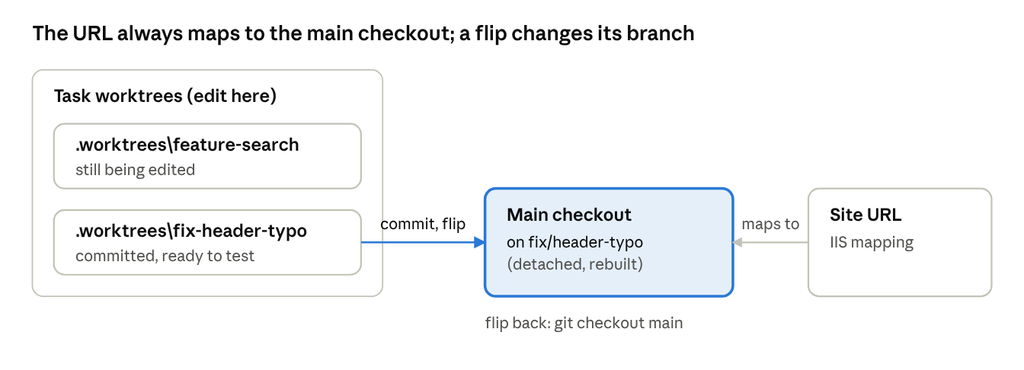
Git has this feature called worktrees. It lets you have more than one folder checked out from the same repo, each on its own branch. So every task gets its own folder under .worktrees\, and that’s where all the editing for it happens.
My local site in IIS maps its URL to the main checkout folder of the repo, and that never changes. When I want to test a task, I “flip” the main checkout over to that task’s branch and rebuild. When I’m done testing, I flip it back to main. That’s the whole trick.
How I built it
The whole thing is just git shifting branches around. Since the URL always maps to the main checkout, there’s nothing else to move. The skill is a SKILL.md with a handful of plain git commands and a few rules for Claude to follow:
- Start a task:
git worktree add .worktrees/<name> -b <branch>. The first time,.worktrees/goes into.git/info/excludeso git ignores it. - Flip to it: commit the work in the worktree, then in the main checkout run
git checkout --detach <branch>and rebuild. - Flip back:
git checkout main. - Finish: flip back if needed, then
git worktree removeand delete the branch once it’s merged.
Two gotchas I had to write down. A flip only picks up committed changes, since it’s just a checkout. And you need --detach, because git won’t let the same branch be checked out in two places at once, and it’s already checked out in the task’s worktree.
How I use it day to day
Honestly I barely think about it now. I just say things like:
- “Start work on the header typo” and it makes a new worktree and branch.
- “Let me see it” and it commits, flips the main checkout to that branch, and rebuilds.
- “Go back to main” and the main checkout is back on
main. - “I’m done with that one” and it removes the worktree and cleans up the branch.
The part I like most is when a bug comes in while I’m in the middle of something. I don’t stash anything or lose my place. The bug fix gets its own worktree, I flip to test it, push it, and flip right back.
What I learned
If you want to make your own skill for something you do a lot, here’s what helped me:
- Let the tools you already have do the work. Plain git turned out to be enough.
- Write down the mistake that’s easiest to make. Mine says “edit in the worktree, never in the main checkout,” because flipping overwrites the main checkout.
- Make anything risky stop and ask. Claude checks that
git statusis clean before a flip, and asks before forcing a worktree removal. - Describe it in your own words, so it kicks in when you talk normally.
It’s not fancy. It just made testing easy enough that I actually do it more now.